AI Office Manager: Smart email assistance

Project: Personal AI assistant for email management via Gmail and Outlook with Telegram integration

Gmail automation Outlook integration AI categorisation Telegram bot n8n workflows

The challenge

With multiple email accounts (Gmail and Outlook) and dozens of emails per day, inbox management quickly becomes time-consuming. Important messages disappear between newsletters, spam and less urgent communications.

The wish: a personal assistant that automatically categorises emails, flags urgent messages, and that I can control via Telegram to read, reply to or send emails.

The core question

"How can AI automate my email management without giving access to external parties?"

Solution: Dual Email Manager

Two parallel n8n workflows that manage both Gmail and Outlook with AI-driven categorisation.

Gmail Manager

  • Automatic scan every 15 minutes
  • AI categorisation into 4 main groups
  • Gmail labels automatically applied
  • Urgency detection with Telegram alerts
  • Tracking via Google Sheets

Outlook Manager

  • Automatic scan every 15 minutes
  • AI categorisation into 5 categories
  • Outlook categories automatically applied
  • Urgency detection with Telegram alerts
  • Tracking via Microsoft Excel

Gmail categories

ACTION
NEWS
ARCHIVE
SPAM

Outlook categories

AI news
Internal De_Eijk
Note-to-self
Assignment info
Other

The workflow in action

This is how the AI Office Manager processes every incoming email.

Trigger (15 min)

Fetch email

AI analysis

Categorise

Alert (urgent)

AI-driven decisions

The AI agent analyses each email based on:

  • Sender - Known contacts get priority
  • Subject - Patterns are recognised
  • Content - Context determines urgency
  • Historical data - Learning from previous decisions

The AI is trained to recognise phishing and social engineering, and is not fooled by "urgent" requests from unknown senders.
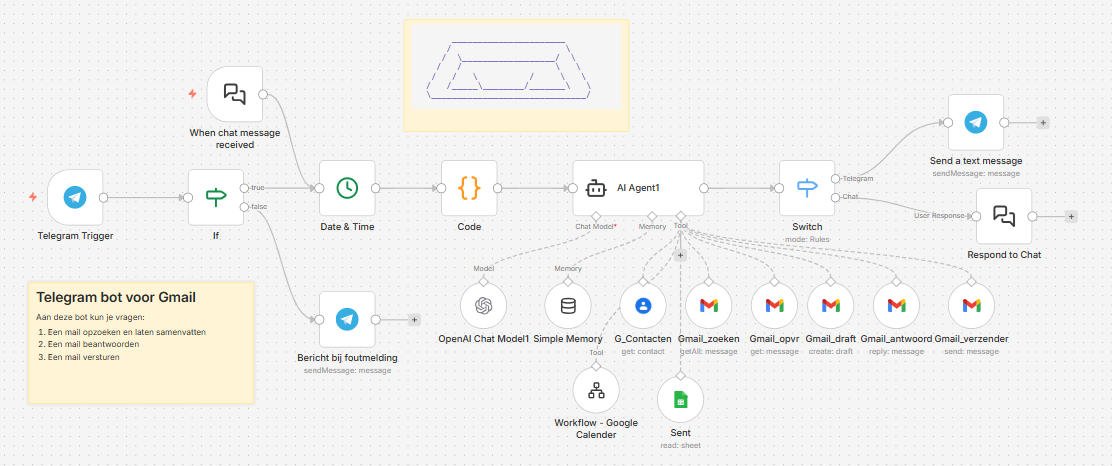
Gmail Telegram Bot workflow

Telegram: Your email in your pocket

Via a Telegram bot you can manage your email with natural language.

Telegram Gmail Bot capabilities

Search email "Find emails from Jan about the project"
Read email "What does the latest email from my accountant say?"
Draft message "Write an email to Piet to reschedule the meeting"
Send directly "Send an email to info@company.com about the quote"
Reply "Reply to yesterday's email with: agreed!"
Calendar check "When am I available next week?"
Smart integrations

The bot has access to Google Contacts for email addresses, Google Calendar for availability, and previously sent emails as a reference for writing style.

The result

Hours saved per week

No more manual sorting. Emails are immediately categorised and labelled.

Never miss an urgent message

Important emails arrive directly via Telegram, wherever you are.

Email from anywhere

Via Telegram you can read and send emails without opening your inbox.

Privacy preserved

Everything runs on own servers. No external parties with access to your mail.

Technical details

Technologies used

  • n8n - Workflow automation platform
  • Claude (Anthropic) - Primary AI for categorisation
  • GPT-4 (OpenAI) - Alternative AI model
  • Mistral - Fallback AI model
  • Telegram Bot API - Mobile interface
  • Gmail API - Email access and labels
  • Microsoft Graph API - Outlook integration
  • Google Sheets/Excel - Logging and tracking

Architecture principles

  • Self-hosted - Full control over data
  • Modular - Each component is replaceable
  • Redundant - Multiple AI models as fallback
  • Rate limited - Pauses between processing
  • Error handling - Telegram alerts on errors
  • Audit trail - Everything is logged in spreadsheets

Want to handle your email more smartly too?

A personal AI office manager can save you hours per week.
Let's discuss what is possible for your situation.

Schedule a call
Questions about AI for your business?

De_AIjk Assistant

Connecting...
Hello! I'm the AI assistant of De_AIjk. How can I help you?